How do Coding Agents work?
Coding Agents like Claude Code have improved a lot in the last 3 to 6 months.
While doing that, I started to wonder how this system actually works.
How does this thing work?
So I wrote down some notes from what I found.
What is Coding Agents?
Until recently, using AI for development mostly meant things like:
- asking ChatGPT about foo or bar
- using tab completion with AI inside an IDE
LLMs have become much smarter too.
Then things started to change with the release of Opus 4.5.
Coding Agents like Claude Code can read code, make plan, and implement changes by themselves when you give instructions in the CLI.
If there is an error in test or lint, they can read the logs and fix it.
Now many companies have their own Coding Agents, such as Claude Code, Codex, GitHub Copilot, Cursor, and OpenCode.
The Basic Idea
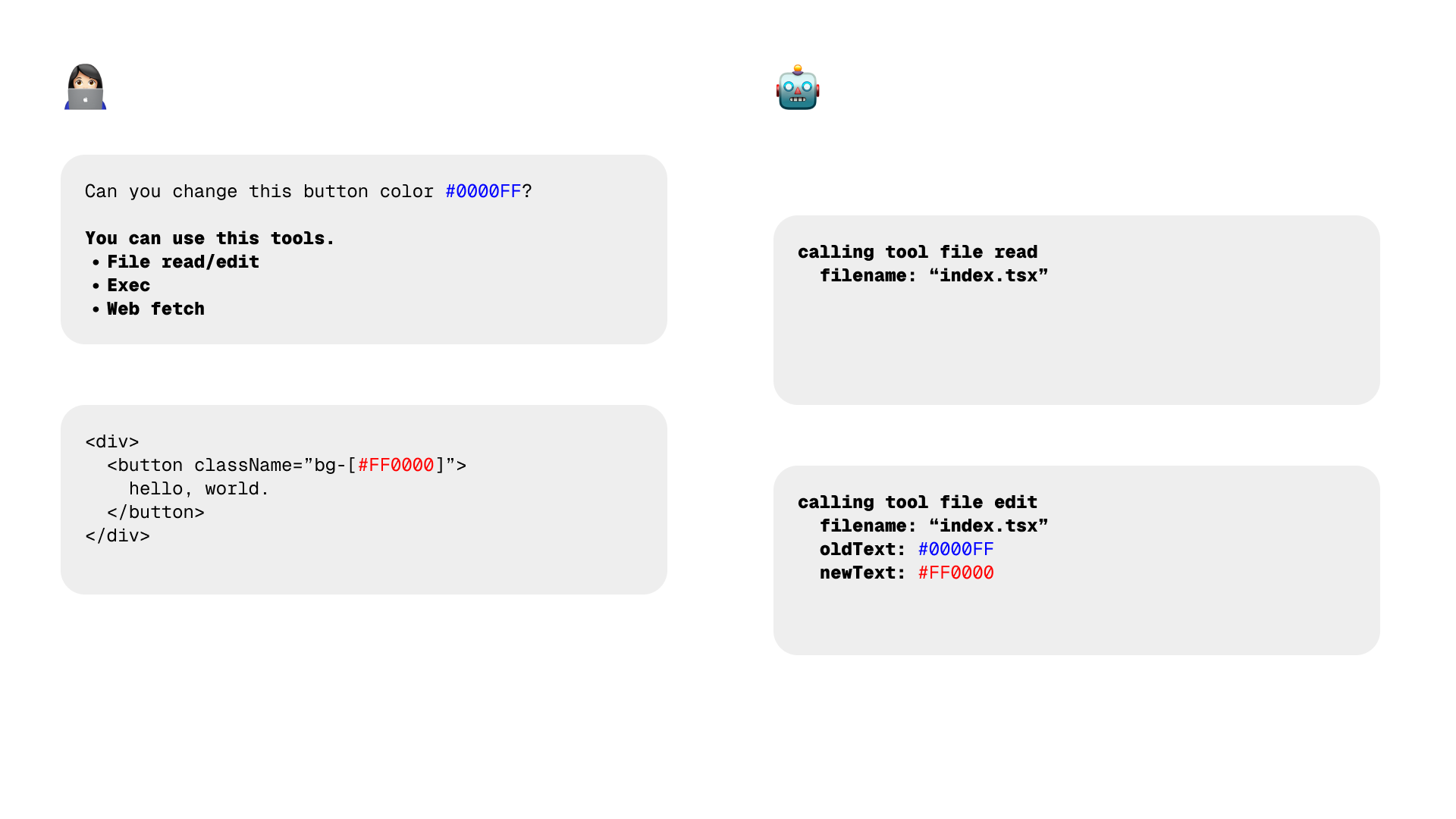
So how do these agents work by themselves?
It is usually a loop like this:
-
👩🏻💻 The agent -> 🤖 The LLM:
- the task you want to do ("I want to change the button color")
- the tools it can use
-
🤖 The LLM -> 👩🏻💻 The Agent:
- call tool
- 👩🏻💻 The Agent -> 🤖 The LLM:
- result of the tool call
This loop continues until the task is done.
What Tools Does an Agent Have?
So what kind of tools can Coding Agents use?
In general, many agents have tools like these:
- planning
- file read/edit
- search
- execution
- website
- MCP
For example, Claude Code Agent SDK defines the following tools:
https://platform.claude.com/docs/en/agent-sdk/typescript#tool-input-schemas
Context
One of the most important parts is search.
For example, imagine you ask the agent to add a description feature to a todo app.
In that case, the agent needs to find which files are related to the todo feature and give them to the LLM.
If the codebase is very small, you can pass everything to the LLM.
But if it is not small, the choice of which files to include as context can greatly change the result.
There are a few common ways to do this:
- keyword search with
globandgrep - finding references and definitions with LSP with Tree-sitter
In many cases, this already works very well.
Keyword search is all you need:
https://www.amazon.science/publications/keyword-search-is-all-you-need-achieving-rag-level-performance-without-vector-databases-using-agentic-tool-use
Cursor also probably uses extra features like these, especially to make tab completion faster:
- Vector search
- Merkle Trees
Build to Learn
To learn how Coding Agents work, I made a mini mini (about 1000 lines of code) it by myself.
https://github.com/andraindrops/micoli
I would be happy if you give me feedback 💌